








Customer communication

One platform for all your customer communication

Letters, emails, portal messages and push notifications: CustomerConnect creates and sends all your outbound customer communication from one place. You follow processing and delivery, and for digital communication you get insight into things like opens, clicks and bounces. Harmony developed and manages the platform and processes around 50 million communications a year.

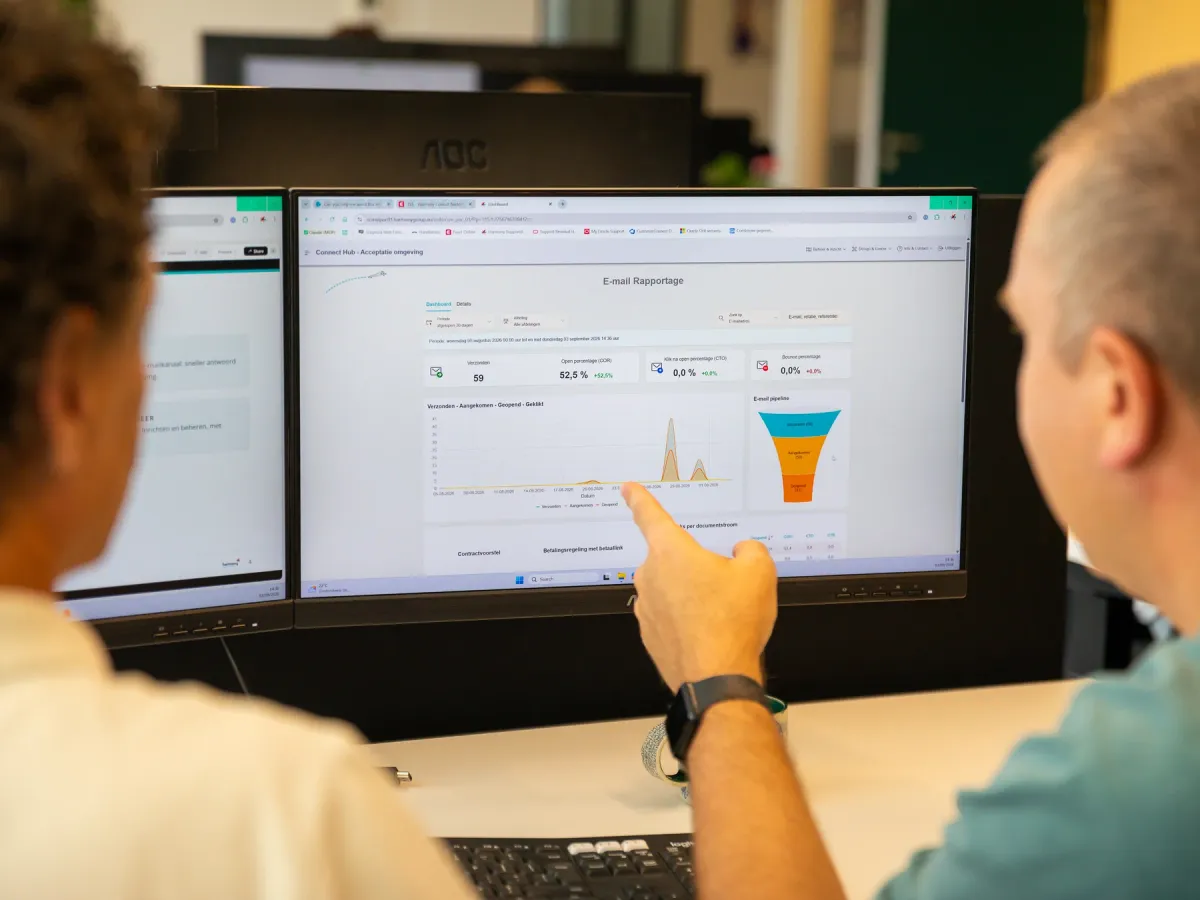
Two colleagues look at the email report in CustomerConnect together, with the sending figures and a funnel on the screen.

In use at

Who it is for

CustomerConnect is relevant when you

  • Send customer communication from several separate systems.
  • Want to handle changes to letters and emails faster.
  • Need to be able to prove that customer communication was sent and received.
  • Need to process large volumes of document communication, peak periods included.
  • Want to offer letters, emails and portals in the same house style throughout.
  • Would rather not develop and maintain your own software for customer communication.

Features

Everything you can do with CustomerConnect

  • A staff member in a mail room smiles as he places a stack of printed letters on the belt, printers in the background.

    Letters and physical post

    Send one letter to one customer or thousands at once. CustomerConnect prepares the documents and sends them to the printer or print partner you choose. You stay in control of what goes out.

    Send letters
  • A customer contact employee with a headset smiles as she helps a customer on the phone, her screen beside her.

    Email with proof

    Send personalised emails and see what happens to each message. Delivered, opened, clicked or bounced: your staff find the delivery status and the proof for every email in CustomerConnect.

    Prove every email
  • A man with his phone in his hand smiles at a friend on a station platform.

    Push and in-app messages

    Send customers a push notification through your own app or put a message ready in their customer portal. That way you choose the channel that fits each communication, without falling back on a letter or an email by default.

    Send notifications
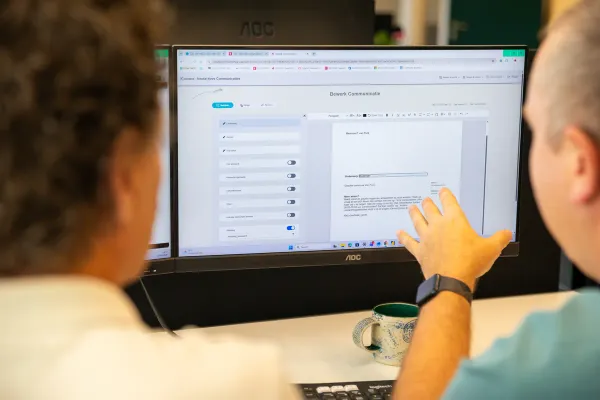
  • A staff member points at a text block in the CustomerConnect editor on the screen, while a colleague looks on.

    Templates and house style

    Work with fixed templates for letters, emails and other customer communication. The wording can change while the agreed house style stays. You manage it yourselves or leave it to Harmony.

    Manage your templates
  • A marketer talks through a newsletter with a colleague, smiling, the template on the screen beside them.

    Send your own mailings

    Create and send a one-off mailing yourself from CustomerConnect. Add the addresses, choose the template and the channel, check the communication and send it. No separate technical project for every mailing.

    Create your own mailings
  • An older couple at the kitchen table: he reads a letter while she drinks her coffee, a laptop open beside them.

    Pay and share securely

    Make customer communication something customers can act on straight away. Add a payment link, for example, or share confidential information through a secure environment. That way a customer doesn't have to go looking for the next step after reading a message.

    Make paying easy
  • An employee smiles as she checks a printed letter, the mailing on the screen beside her.

    Insights and reporting

    Follow customer communication through the whole delivery chain and see where something gets stuck. For email you also see what happens after sending, such as delivery, opens, clicks and bounces.

    Track every mailing
  • A young couple on the sofa of their new home, among moving boxes, with their baby, a cat and a tablet on their lap.

    Digital archive

    Keep the customer communication you send in a digital archive and make earlier letters and messages available in the customer portal or the customer's own online account. That way customers and your staff find earlier communication more easily.

    Archive digitally
  1. InputData from your back-office systems, such as Oracle, Salesforce or an application of your own, as XML, JSON or CSV.
  2. PrepareBusiness logic chooses the channel, templates create the message.
  3. ReviewYour staff check, then approve or reject.
  4. ScheduleMailings are scheduled and bundled per channel.
  5. SendBy post, email, customer portal or push message.
  6. Chain checkDelivery tracked, and for digital also opens, clicks and bounces.

How we work together

As a tool in your own hands or fully taken care of

CustomerConnect is Harmony's platform for managing and sending digital and physical customer communication from one place.

You choose how far Harmony comes along. Use CustomerConnect as a tool and run everything yourselves, also as a light version for smaller organisations. Or choose the full service: Harmony sets it up, connects it, watches over it and solves what comes up, while you stay in control of what is sent.

CustomerConnect as a tool

The platform in your own hands: your team creates, checks and sends the communication itself. Also as a light version for smaller organisations.

  • Templates, business logic and review in one place
  • Post, email, push, in-app and the customer portal
  • Put together and send your own mailings
  • Chain monitor and reporting

Fully taken care of by Harmony

Harmony takes over the technology and the follow-up, from the first connection to the last letter through the door. You review the content and choose whether sending runs automatically or at a moment you decide.

  • Data from your other platforms fetched correctly for personalisation
  • Connections to payment systems, digital signatures and certified documents
  • Checks, follow-up and a service desk that coordinates with the print line and service providers
  • ISO 27001, NEN 7510 and annual pentests

Our approach

From first scan to daily dispatch

We start with the communication you send today: which flows, which channels and where the friction is. Then we move it to CustomerConnect step by step, without your mailings coming to a halt along the way.

  1. Quickscan

    We map your current communication: which flows there are, which channels they run through and where the friction is. You get a concrete picture of what CustomerConnect can take over and where we start.

  2. Proof of Concept

    We set up one recognisable communication flow in CustomerConnect, with your own data and house style. That way you see the result before the rest follows.

  3. Architecture

    We decide how CustomerConnect connects to your back-office systems and set milestones and a schedule, so the switch is predictable.

  4. Implementation and migration

    We set up the platform and bring over existing templates and flows. We migrate things as they are first and improve them after go-live, so your communication keeps running during the switch. Your team gets training to compose and manage communication themselves.

  5. Management and further development

    After go-live we monitor processing and the chain proactively. Our service desk resolves disruptions and liaises with service providers where needed. New capabilities are added in agreed releases.

Where we use it

Customer communication for insurers, banks and lotteries

CustomerConnect runs at organisations that communicate with large numbers of customers or participants. Below you can see what it delivers in each sector.

Another sector? No problem. CustomerConnect works for any organisation that communicates a lot, and carefully, with its customers.

Talk to an expert
A staff member reads through a letter at her desk while a colleague behind her looks on.An adviser goes through details on a tablet with a client, at a table by the window with a square in the background.A lottery employee smiles as she reads a prize letter, a stack of envelopes on the desk in front of her.

Health insurers

Health insurers send large numbers of letters and messages all year round. The annual cycle adds the premium period on top, and the demands on security keep rising. This is what CustomerConnect solves there.

  • Large mailings on time, all year round

    Large runs are scheduled, bundled and tracked, in the regular work and in the annual cycle. So in the premium period too, every mailing reaches the policyholder on time.

  • Sharing in confidence, within Europe

    Personal and medical documents go by secure email: the policyholder only opens the message with a code that arrives separately. A European alternative, with data that stays in Europe.

  • Security that is tested every year

    Harmony is certified for ISO 27001 and NEN 7510, and has the platform put to the test externally every year.

  • From your own installation to the cloud

    Existing output flows move to the CustomerConnect cloud platform, first as they are and then improved.

Banks and financial services

Banks send large numbers of statements, contracts and statutory notices, under supervision and, since January 2025, under DORA. This is what CustomerConnect solves there.

  • Ready for DORA

    CustomerConnect already runs under a DORA addendum at an insurer. So Harmony has already made the agreements that DORA asks of an ICT service provider.

  • An exit that is agreed in advance

    An exit and migration plan is part of the agreements, so your communication is never tied to one supplier.

  • Ready for audit and supervision

    ISO 27001, ISAE 3000 and annual external pentests provide the evidence an auditor or supervisor asks for.

  • All communication in one house style

    From account statement to contract change: everything comes from the same templates, by post, email or in the app.

Lotteries and charities

A lottery communicates with millions of participants about taking part, draws and prizes, and every message has to be right. This is what CustomerConnect solves there.

  • Millions of messages, processed in one go

    After every draw, hundreds of thousands of prize letters and emails have to go out at once. CustomerConnect processes runs like that in one go and tracks them all the way to the participant, even when the volume climbs to millions of messages a month.

  • Less time on execution

    Templates and automatic processing take over the manual work and revision rounds, so the team has time for improvements.

  • Growth without extra people

    The platform scales with the number of participants and prizes, without extra hands needed for every draw.

  • Less chance of errors

    Templates and a check before sending prevent incorrect prize or participation information.

Cases

Where CustomerConnect runs every day

The illuminated Postcode Loterij prize truck at night, with a man holding up a prize cheque.

Efficient management of millions of annual touchpoints

  • 50%Employees spend on average 50% less time on operational tasks and review rounds and can focus on improvement projects
  • 5 millionThe scalability of the system supported growth of 5 million prize communications without extra staff.
“Harmony has a really good service. We have good, pleasant dialogues and they are also there for us in product development.”
Erik MeinigerManager, Winners and Confirmation Team
Read the case

Frequently asked questions

What clients ask us

What is CustomerConnect?

CustomerConnect is Harmony's customer communication platform. Organisations use it to create, send and track all their outbound communication, from letter to email, portal and push message, from one place. Harmony developed the platform and takes care of processing and management.

What is Customer Communication Management (CCM)?

Customer Communication Management means designing, personalising, sending and tracking outbound customer communication centrally, across all channels. CustomerConnect is a CCM platform: templates and business logic turn data from your systems into letters, emails and messages.

Which channels does CustomerConnect send through?

Physical post, email, the customer portal and push or in-app messages. Letters come from the same templates as the digital messages, so all channels run through the same platform.

Can we manage templates ourselves?

Yes. Functional administrators compose new communication and adjust existing communication, and business users check mailings before they go out. If you would rather not do that yourselves, you can leave template management to Harmony.

How do we know whether a message has arrived?

The chain monitor shows the whole chain in one overview, in plain language, and shows where something gets stuck. For digital messages you also see opens, clicks and bounces, and a timeline with proof for each email.

How does CustomerConnect connect to our systems?

CustomerConnect processes structured data from your back-office systems, for example as XML, JSON or CSV. Business logic decides the channel and the content of each message, so your systems do not have to create communication themselves.

How secure is CustomerConnect?

Harmony is certified for ISO 27001 and NEN 7510 and works with ISAE 3000. An external party tests the platform every year, following PTES and the OWASP Testing Guide among others, and findings are followed up. Processed data stays on the platform for 45 days at most, and the environments are strictly separated from each other.

How does a switch from another system work?

We take stock of the existing templates and flows, set clear milestones and migrate things as they are first. Improvements follow after go-live, so your communication keeps running during the switch.

Talk to an expert

A half-hour conversation is usually enough to see how your communication flows fit on CustomerConnect, and what a first project would cost.

Fields marked with an asterisk are required.

Step 1 of 2
Step 2 of 2
When is the best time to reach you?

Feel free to pick several. If nothing suits you, leave it empty and we will email a suggestion.

Our insights and stories

Email effectiveness decodedCustomer communication

12 September 2023

Email effectiveness decoded

How measuring open and click rates and A/B testing make email campaigns more effective.